Movement speed
The speed at which the cubes move is stored in the speed variable. When moving as a normal cube, it starts at 4505 (0x1199 in hex) and increases to a maximum of 8192 (0x2000), which is called fullspeed.
The speed increase per tick (or acceleration) depends on the number of steps taken since the last prism was collected which is tracked using the variable steps_since_last_prism. The highest acceleration is 1023 at 0 steps, the lowest is 25 at 22 or more steps. Between these values, acceleration declines linearly, resulting in the formula
\text{acceleration}=\lfloor 1023 - \min \\\{\text{steps\\\_since\\\_last\\\_prism}, 22\\\} \cdot 45.36 \rfloor It is currently unknown where the used constants come from, but one assumption could be that the developers wanted to construct a function on which the points (0, 1023) and (22, 25) lie.
To calculate the ticks it takes to reach fullspeed with a given acceleration, which is called acceleration time, you can simply calculate \frac{8192-4505}{\text{acceleration}} if steps_since_last_prism is 14 or less. However, with a higher value (i.e. lower acceleration), the cube completes one or more steps before reaching fullspeed1 which decreases the acceleration and thus increases the acceleration time, so calculating the acceleration time here is not as straightforward. The following table lists the acceleration time for all values of steps_since_last_prism:
| Steps since last prism | Acceleration | Steps until fullspeed | Acceleration time (ticks) | Acceleration time (real time seconds) |
|---|---|---|---|---|
| 0 | 1023 | 0 | 4 | 0.13 |
| 1 | 977 | 0 | 4 | 0.13 |
| 2 | 932 | 0 | 4 | 0.13 |
| 3 | 886 | 0 | 5 | 0.17 |
| 4 | 841 | 0 | 5 | 0.17 |
| 5 | 796 | 0 | 5 | 0.17 |
| 6 | 750 | 0 | 5 | 0.17 |
| 7 | 705 | 0 | 6 | 0.2 |
| 8 | 660 | 0 | 6 | 0.2 |
| 9 | 614 | 0 | 7 | 0.23 |
| 10 | 569 | 0 | 7 | 0.23 |
| 11 | 524 | 1 | 8 | 0.27 |
| 12 | 478 | 1 | 8 | 0.27 |
| 13 | 433 | 1 | 9 | 0.3 |
| 14 | 387 | 1 | 10 | 0.33 |
| 15 | 342 | 1 | 12 | 0.4 |
| 16 | 297 | 2 | 14 | 0.47 |
| 17 | 251 | 2 | 17 | 0.57 |
| 18 | 206 | 3 | 24 | 0.8 |
| 19 | 161 | 9 | 63 | 2.1 |
| 20 | 115 | 16 | 103 | 3.43 |
| 21 | 70 | 19 | 130 | 4.33 |
| 22 and higher | 25 | 21 | 148 | 4.93 |
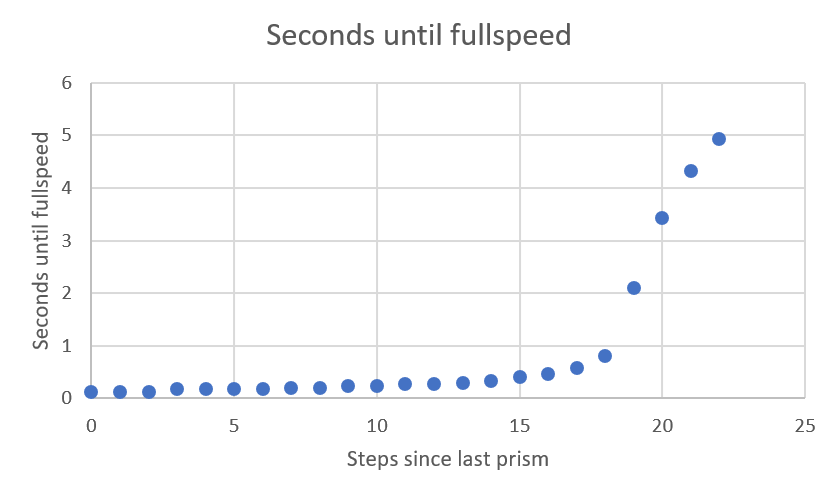
Notice the significant increase of acceleration time around 20 steps after the last prism has been collected. This leads to the noticeable slow-down of the cube after moving some time without collecting a prism.
For values 21 and 22, the slope of the graph decreases because acceleration doesn't change after steps_since_last_prism reaches 22 which means that the steps until fullspeed don't negatively affect acceleration that much. (Actually, the simple formula mentioned above applies again for values 22 and higher since acceleration doesn't change at all for these values)
Cube angle
(*Some of the constants mentioned here are guessed through experimenting and have not yet been found in the game’s code. The only value that has been found so far is the number 61440 (0xF000 in hex), which lead to the assumption that multiples of 4096 (0x1000) are used for all constants.)
The cube moves by rolling from one side to another. How fast the cube rolls depends on its speed. The angle variable controls the angle between the cube and the ground, ranging from 0 (0°) to 126976* (0x1F000) (~90°). When movement is started by user input, angle is set to 4096 and another variable angle_speed is set to 0. To simulate a gravity force that pulls the cube downwards, the constant GRAVITY is used, which is always set to 2457 (0x999).
The following instructions are then performed on every tick:
-
Apply gravity by
- subtracting
GRAVITYfromangle_speedifangleis smaller than 57344* (0xE000) (~45°). This is the case when the cube inclines (i.e. has to work against gravity). - adding
GRAVITYtoangle_speedifangleis greater than or equal to 57344* (0xE000) (~45°). This is the case when the cube declines (i.e. has gravity supporting its motion).
This instruction leads to a slow incline and a fast decline of the cube.
- subtracting
-
Increase
angle_speedby the current value ofspeed. -
Increase
anglebyangle_speed. -
If
angleis greater than 126976 (~90°): The cube has moved one step. Reset its variables for its next step by- dividing
angle_speedby 10. - setting
angleto 0.
- dividing
Note: These instructions show that speed does not directly correspond to the number of steps per second.
Additional failsafe checks
The game performs some additional checks to modify the values of angle_speed and angle, probably as failsafe mechanisms. However, their conditions are rarely fulfilled during normal gameplay:
- If
angle_speedis 0 at the beginning of a tick,angleis set to 4096. angle_speedis only increased byspeedif the resulting value ofangle_speedis less than 61440 (0xF000).- If
angleis negative, bothangle_speedandangleare set to 0. - If
angle_speedis greater than 61440 (0xF000) at the end of a step,angleis not set to 0 but to\left(\left\lfloor \frac{\text{angle}}{4096}\right\rfloor - 31\right) \cdot 4096.
Prisms
When entering a level, steps_since_last_prism is set to 22, i.e. the slowest acceleration, and increased by 1 for every step taken. When collecting a prism, steps_since_last_prism is set to 0 and another variable called prism_boost_timer is set to 100. This variable is decreased by 1 every tick, and steps_since_last_prism is not increased if prism_boost_timer is greater than 0.
This means that after collecting a prism, there is a prism boost that lasts for 100 ticks and lets the cube move without increasing steps_since_last_prism.
Climbing
When climbing, the cube moves one block upwards and one block in its moving direction. Therefore, its movement is split into two parts:
- During the upwards movement, no acceleration is added to
speed. Additionally,GRAVITYis always subtracted fromangle_speedsince the cube has to work against gravity the entire time. Whenangleis greater than 126976,angleis set to 4096 for the second movement.angle_speedis not changed. - The other movement proceeds almost the same as a normal movement, the only differences being that
angle_speeddoes not start at 0 and is divided by 6 instead of 10 at the end of the step.
Minicube
When moving as a minicube, speed is instantly set to 16384 with no acceleration. With such a high speed, it is possible that angle_speed becomes greater than 45056* (0xB000), in which case it is not increased by speed anymore.
Minicube movement also shows that speed is not proportional to the number of steps per second: Normal cube movement at 8192 speed takes 6 ticks per step, while minicube movement at 16384 speed takes 4 ticks per step.
Since the minicube has to complete three steps per block, moving as a normal cube with fullspeed is twice as fast as moving as a minicube:
| Normal Cube | Minicube | |
|---|---|---|
| Speed | 8192 | 16384 |
| Ticks per step | 6 | 4 |
| Steps per block | 1 | 3 |
| Ticks per block | 6 | 12 |
Other cubes
Other cubes (holocube and darkcube) use almost the same movement logic as the normal cube. The only differences are:
- Other cubes always have an acceleration of 26 because they can't collect prisms.
- Other cubes have no speed limit, so their speed can increase freely past 8192.
- The minicube version of other cubes doesn't have a fixed speed of 16384 which means it also starts at 4505 speed and has no speed limit.
Simulation
Using all this information, we can write a python script that simulates speed and acceleration in EDGE:
GRAVITY = 2457 # 0x999
START_SPEED = 4505 # 0x1199
MINICUBE_SPEED = 16384
OTHERCUBE_ACCELERATION = 26
START_ANGLE = 4096
SPEED_LIMIT = 8192
ANGLE_SPEED_LIMIT = 61440 # 0xF000, found in game's code
ANGLE_THRESHOLD_GRAVITY = 57344 # 0xE000
ANGLE_THRESHOLD_RESET = 126976 # 0x1F000, guessed through experimenting

columns = 'Tick Boost Steps Accel Speed ASpeed  Angle'

def simulate(ticks, steps_since_last_prism, prism_boost_timer=0, prism_collected=False, const_speed=None, climbing=False, minicube=False, othercube=False, output_level=0):
    """
    output_level:
        0: No output
        1: Output after each step
        2: Output after each tick
        3: Output after each variable change
    """
    def log(required_level, text=''):
        if output_level >= required_level:
            if not text:
                print(f'{i+1:4d} {prism_boost_timer:5d} {steps_since_last_prism:5d} {acceleration:5d} {speed:5d} {angle_speed:6d} {angle:6d}')
            else:
                print(text)

    speed = START_SPEED if const_speed is None else const_speed
    angle_speed = 0
    angle = START_ANGLE
    climbed = False

    steps = 0
    last_step = 0

    log(2, text=columns)
    for i in range(ticks):
        if const_speed is not None:
            speed = const_speed

        # prisms
        if prism_collected:
            steps_since_last_prism = 0
            prism_boost_timer = 100
            prism_collected = False
            log(3)

        prism_boost_timer -= 1
        log(3)

        # acceleration
        acceleration = int(1023 - min(22, steps_since_last_prism) * 45.36) if not climbing else 0
        log(3)

        # speed
        if othercube:
            speed += OTHERCUBE_ACCELERATION
        elif minicube:
            speed = MINICUBE_SPEED
        else:
            speed = min(SPEED_LIMIT, speed + acceleration)
        log(3)

        # failsafe 1
        if angle_speed == 0:
            angle = START_ANGLE
            log(3)

        # gravity and angle speed
        if angle >= ANGLE_THRESHOLD_GRAVITY and not climbing:
            angle_speed += GRAVITY
        else:
            angle_speed -= GRAVITY
        log(3)

        if angle_speed + speed < ANGLE_SPEED_LIMIT:  # failsafe 2
            angle_speed += speed
            log(3)

        # angle
        angle += angle_speed
        log(3)

        # failsafe 3
        if angle < 0:
            angle_speed = 0
            angle = 0
            log(3)

        # reset
        if angle > ANGLE_THRESHOLD_RESET:
            if not climbing:
                if angle_speed > ANGLE_SPEED_LIMIT:  # failsafe 4
                    angle = (angle // 4096 - 31) * 4096
                else:
                    angle = 0
                log(3)

                angle_speed //= 10 if not climbed else 6
                climbed = False
            else:
                angle = START_ANGLE
                climbing = False
                climbed = True
            log(3)

            if prism_boost_timer <= 0:
                steps_since_last_prism += 1
                log(3)

            steps += 1
            log(1, text=f'Step {steps:3d}: {i - last_step:3d} ticks')
            log(2, text=columns)
            last_step = i

        log(2)
Ticks per Step
With this script, we can calculate the number of ticks it takes to move any number of steps depending on steps_since_last_prism:
| Steps since last prism | Ticks per step |
|---|---|
| 0-8 | 6, 6, ... |
| 9-16 | 7, 6, 6, ... |
| 17-18 | 8, 6, 6, ... |
| 19 | 8, 7, 6, 6, ... |
| 20 | 8, 7, 7, 7, 7, 6, 6, ... |
| 21 | 9, 8, 7, 7, 7, 7, 7, 7, 7, 6, 6, ... |
| 22+ | 9, 8, 8, 8, 8, 7, 7, 7, 7, 7, 7, 6, 6, ... |
It's interesting that despite the noticeable slowdown of the cube after 20 steps since last prism, the time difference per step is just 3 ticks (0.1 seconds) at most.
Here is a table showing how many ticks it takes to make up to 15 steps depending on the steps since last prism:
| Number of Steps | 0-8 | 9-16 | 17-18 | 19 | 20 | 21 | 22+ |
|---|---|---|---|---|---|---|---|
| 1 | 6 | 7 | 8 | 8 | 8 | 9 | 9 |
| 2 | 12 | 13 | 14 | 15 | 15 | 17 | 17 |
| 3 | 18 | 19 | 20 | 21 | 22 | 24 | 25 |
| 4 | 24 | 25 | 26 | 27 | 29 | 31 | 33 |
| 5 | 30 | 31 | 32 | 33 | 36 | 38 | 41 |
| 6 | 36 | 37 | 38 | 39 | 42 | 45 | 48 |
| 7 | 42 | 43 | 44 | 45 | 48 | 52 | 55 |
| 8 | 48 | 49 | 50 | 51 | 54 | 59 | 62 |
| 9 | 54 | 55 | 56 | 57 | 60 | 66 | 69 |
| 10 | 60 | 61 | 62 | 63 | 66 | 72 | 76 |
| 11 | 66 | 67 | 68 | 69 | 72 | 78 | 83 |
| 12 | 72 | 73 | 74 | 75 | 78 | 84 | 89 |
| 13 | 78 | 79 | 80 | 81 | 84 | 90 | 95 |
| 14 | 84 | 85 | 86 | 87 | 90 | 96 | 101 |
| 15 | 90 | 91 | 92 | 93 | 96 | 102 | 107 |
Constant Speed
Using the const_speed parameter, we can fix speed to a set value, avoid any acceleration and thereby measure the ticks per step depending on speed, which can then be used to calculate the steps per second. Shown here is a condensed version of the full data which can be viewed here. (The real full version which is too large to be rendered by GitHub is here)
| Speed (Without Acceleration) | Angle Speed | Ticks per Step | Steps per Second |
|---|---|---|---|
| 2458-2467 | 1-10 | 26 | 1.15 |
| 2468-2479 | 11-22 | 25 | 1.2 |
| 2480-2494 | 23-37 | 24 | 1.25 |
| 2495-2512 | 38-55 | 23 | 1.3 |
| 2513 | 56 | 22.5 | 1.33 |
| 2514-2529 | 57-72 | 22 | 1.36 |
| 2530-2532 | 73-75 | 22.33 | 1.34 |
| 2533-2536 | 76-79 | 22.5 | 1.33 |
| 2537-2547 | 80-90 | 21 | 1.43 |
| 2548-2550 | 91-93 | 21.33 | 1.41 |
| 2551 | 94 | 21.5 | 1.4 |
| 2552-2553 | 95-96 | 21.67 | 1.38 |
| 2554 | 97 | 21.75 | 1.38 |
| 2555-2559 | 98-102 | 22 | 1.36 |
| 2560-2566 | 103-109 | 21 | 1.43 |
| 2567-2568 | 110-111 | 20 | 1.5 |
| 2569 | 112 | 20.4 | 1.47 |
| 2570 | 113 | 20.5 | 1.46 |
| 2571 | 114 | 20.6 | 1.46 |
| 2572-2584 | 115-127 | 21 | 1.43 |
| 2585-2617 | 128-160 | 20 | 1.5 |
| 2618 | 161 | 19.5 | 1.54 |
| 2619 | 162 | 19.33 | 1.55 |
| 2620-2655 | 163-198 | 19 | 1.58 |
| 2656 | 199 | 18.75 | 1.6 |
| 2657-2658 | 200-201 | 18.5 | 1.62 |
| 2659-2704 | 202-247 | 18 | 1.67 |
| 2705-2707 | 248-250 | 17.5 | 1.71 |
| 2708-2766 | 251-309 | 17 | 1.76 |
| 2767-2770 | 310-313 | 16.5 | 1.82 |
| 2771-2846 | 314-389 | 16 | 1.88 |
| 2847 | 390 | 15.67 | 1.91 |
| 2848-2851 | 391-394 | 15.5 | 1.94 |
| 2852 | 395 | 15.33 | 1.96 |
| 2853-2952 | 396-495 | 15 | 2 |
| 2953 | 496 | 14.67 | 2.04 |
| 2954-2959 | 497-502 | 14.5 | 2.07 |
| 2960 | 503 | 14.33 | 2.09 |
| 2961-3078 | 504-621 | 14 | 2.14 |
| 3079-3084 | 622-627 | 13.67 | 2.19 |
| 3085-3104 | 628-647 | 13.5 | 2.22 |
| 3105-3106 | 648-649 | 13.33 | 2.25 |
| 3107-3204 | 650-747 | 13 | 2.31 |
| 3205 | 748 | 12.75 | 2.35 |
| 3206-3211 | 749-754 | 12.67 | 2.37 |
| 3212-3277 | 755-820 | 12.5 | 2.4 |
| 3278-3284 | 821-827 | 12.33 | 2.43 |
| 3285 | 828 | 12.25 | 2.45 |
| 3286-3405 | 829-948 | 12 | 2.5 |
| 3406-3413 | 949-956 | 11.67 | 2.57 |
| 3414-3449 | 957-992 | 11.5 | 2.61 |
| 3450-3456 | 993-999 | 11.33 | 2.65 |
| 3457 | 1000 | 11.25 | 2.67 |
| 3458-3712 | 1001-1255 | 11 | 2.73 |
| 3713-3714 | 1256-1257 | 10.67 | 2.81 |
| 3715-3736 | 1258-1279 | 10.5 | 2.86 |
| 3737-3739 | 1280-1282 | 10.33 | 2.9 |
| 3740-4174 | 1283-1717 | 10 | 3 |
| 4175-4178 | 1718-1721 | 9.67 | 3.1 |
| 4179-4213 | 1722-1756 | 9.5 | 3.16 |
| 4214-4216 | 1757-1759 | 9.33 | 3.22 |
| 4217-4710 | 1760-2253 | 9 | 3.33 |
| 4711 | 2254 | 8.75 | 3.43 |
| 4712-4723 | 2255-2266 | 8.67 | 3.46 |
| 4724-4844 | 2267-2387 | 8.5 | 3.53 |
| 4845-4856 | 2388-2399 | 8.33 | 3.6 |
| 4857 | 2400 | 8.25 | 3.64 |
| 4858-5401 | 2401-2944 | 8 | 3.75 |
| 5402-5403 | 2945-2946 | 7.75 | 3.87 |
| 5404-5417 | 2947-2960 | 7.67 | 3.91 |
| 5418-5567 | 2961-3110 | 7.5 | 4 |
| 5568-5582 | 3111-3125 | 7.33 | 4.09 |
| 5583-5584 | 3126-3127 | 7.25 | 4.14 |
| 5585-6497 | 3128-4040 | 7 | 4.29 |
| 6498 | 4041 | 6.8 | 4.41 |
| 6499-6508 | 4042-4051 | 6.75 | 4.44 |
| 6509-6583 | 4052-4126 | 6.67 | 4.5 |
| 6584 | 4127 | 6.6 | 4.55 |
| 6585-6662 | 4128-4205 | 6.5 | 4.62 |
| 6663-6682 | 4206-4225 | 6.33 | 4.74 |
| 6683-6684 | 4226-4227 | 6.25 | 4.8 |
| 6685-8191 | 4228-5734 | 6 | 5 |


Some interesting observations with this data:
- Although movement always starts with a speed of 4505, the lowest possible speed that still results in any movement is 2458 since for all lower values
angle_speedwould become negative afterGRAVITYis subtracted. - Without any acceleration, movement with the starting speed of 4505 leads to an
angle_speedof 2048, which could be a reason why the respective values for the starting speed andGRAVITYhave been chosen. - Since the first step of any movement starts with an
angle_speedof 0, but every other step starts with a higher value (1/10 of the value before the previous step was finished), the first step can take significantly longer than all other steps for small speeds. E.g., with a speed of 2458, the first step takes 330 ticks, the second step 28, the third 27, and all other steps take 26 ticks. These higher values are excluded when calculating the average ticks per step, but are mentioned in the "First ticks per step" column in the full table. - Sometimes, the ticks per step cycles periodically through two or more values.
- For some speeds between 2510 and 2580, a higher speed leads to a higher ticks per step, even though it should be lower:

And here are two graphs with the highest angle values reached before angle surpasses ANGLE_THRESHOLD_GRAVITY and ANGLE_THRESHOLD_RESET respectively.


Other cubes
Because of the slightly higher acceleration of other cubes, their ticks per step are also a bit different:
| Step | Ticks per Step |
|---|---|
| 1 | 9 |
| 2-4 | 8 |
| 5-11 | 7 |
| 12-25 | 6 |
| 26 | 5 |
| 27 | 6 |
| 28-53 | 5 |
| ... |
Because of the missing speed limit, other cubes accelerate indefinitely. However, because of all the failsafes, the fastest they get is 2 ticks per block. Also, at a speed of 66463 (after 650 steps) the cube stops moving because failsafe 2 prevents speed from being added to angle_speed. This causes angle_speed and eventually angle to become negative (since GRAVITY is still subtracted from angle_speed), only for failsafe 3 to trigger and set both variables to 0, which then repeats forever. (Or until speed overflows after 63 days and the cube starts moving again like normal)
Notes
1 As you can see in the table, the cube actually completes at least one step before reaching fullspeed when steps_since_last_prism is 11 or higher, but for values 11-14 the lower acceleration is not significant enough to change the acceleration time. ^
Memory Pointers and Offsets
| Variable | Type | Pointer and Offsets |
|---|---|---|
speed |
4 Bytes | edge.exe+1F9064, 34, 148 |
steps_since_last_prism |
4 Bytes | edge.exe+1F9064, 34, 160 |
prism_boost_timer |
4 Bytes | edge.exe+1F9064, 34, 168 |
angle_speed |
4 Bytes | edge.exe+1F9064, 34, 144 |
angle |
4 Bytes | edge.exe+1F9064, 34, 140 |
Changing the first offset of all variables to 0x38 yields the corresponding variables for other cube movement.